
WATLBDLVKTAFour channels, one queue
Run every order from one screen.
WhatsApp and delivery platform orders in one queue, with an AI that answers customers and hands over to your team.

Every order in one queue, the urgent ones first.
Orders from WhatsApp and the delivery platforms land in the same list, grouped by stage. Open one and its whole record sits beside the queue, with the next step one press away.
Late is visible
An order turns amber, then red, at the minutes you set for your kitchen.
Platform deadlines, counted down
When a platform needs an order accepted in time, the countdown is on the order.
Priced once
The total and its VAT are worked out by COVR from your menu and tax settings, never typed in.

An AI on WhatsApp that knows when to hand over.
COVR's assistant answers customers in the language they write in and takes orders from your live menu. When a customer needs a person, the chat is flagged for your staff, and anyone on shift can take it over.

Your own number
Customers message your WhatsApp Business number, and every conversation lands in one inbox.
AI or me, per chat
One switch decides who answers a conversation. Turn the assistant off for one chat or for all of them.
The customer beside the chat
Past orders, average ticket and lifetime value sit next to the conversation.
See what needs you, right now.
The overview opens on what is waiting on a person: late orders, platform deadlines and chats waiting for staff. Below it sit the day's revenue, completed orders and best sellers, for one branch or all of them.

One menu, in Arabic and English.
Every item carries both names, a price and whether it is available, and the WhatsApp assistant sells from the same list.
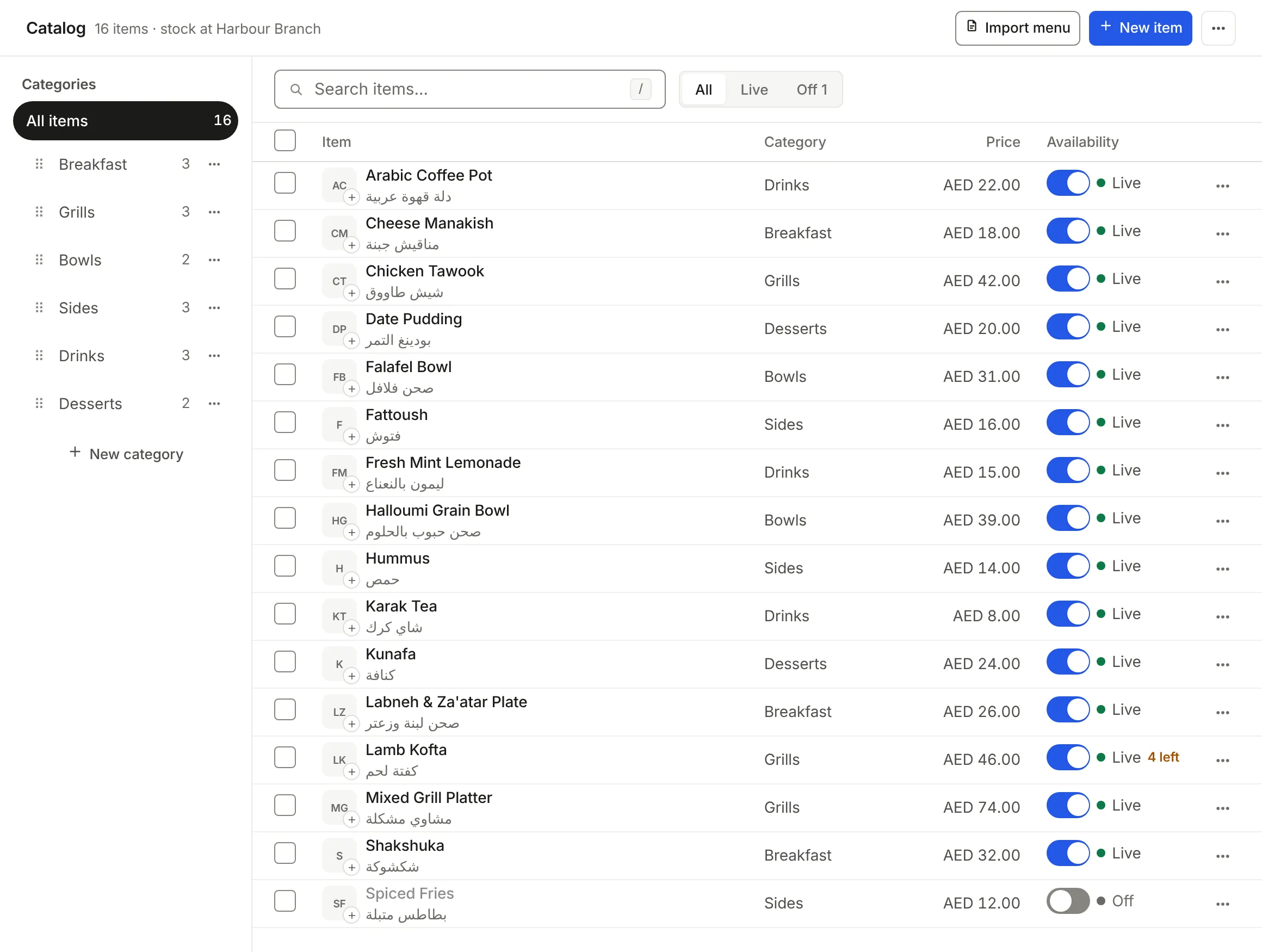
Both languages on every item
An item is saved with its Arabic and its English name, so neither menu falls behind.
Bring the menu you have
Import a spreadsheet or a photo of your printed menu, check what was read, then add it.
Off means off
Switch an item off and the assistant stops offering it in the chat.

Arabic is not a translation here.
The whole product mirrors, from the navigation to the order record. Numerals and dates follow the language, and each person on your team works in the one they choose.


From this page to your first order.
Onboarding is done with you, not left to you.
Tell us about your venue
Fill in the form below. Someone who knows the product reads it and replies, usually within one working day.
We set up your organization
COVR creates your organization with your tax settings and gives the owner a link to set their own password.
Connect WhatsApp and your menu
Connect your WhatsApp Business number and import your menu. A checklist on your overview shows what is left.
What this replaces.
Not one more tablet at the pass. One place for every order you already take.
| Today | With COVR | |
|---|---|---|
| Where orders arrive | A tablet per delivery platform and a phone for WhatsApp | One queue, with the channel on every order |
| What an order costs | Each surface works it out for itself, and two of them disagree | Priced once, from your menu and tax settings |
| Who tells the customer | Whoever remembers, in whatever words they pick | One system, once per stage, in their language |
| Where the day's numbers live | A spreadsheet, filled in at night from memory | The same records that took the orders |
| Arabic | Whatever each separate tool happened to ship | A designed mirror, reviewed beside the English |
Questions operators ask.
If yours is not here, ask it in the form below.
Which channels does COVR take orders from?
WhatsApp, on your own WhatsApp Business number, and the delivery platforms Talabat, Deliveroo and Keeta. Each platform grants its own partner access to your venue, and we connect it with you.
Do we need new hardware?
No. COVR runs in the browser, on a laptop at the pass, a tablet or a phone, and the layout changes to fit each.
What does the AI do, and what does it not do?
It answers customers on WhatsApp, takes orders from your live menu and never sells an item you have switched off. When a customer needs a person it hands the chat to your staff, and you can switch it off for one chat or for all of them.
Can our team work in Arabic?
Yes. Each person chooses Arabic or English for themselves, and the whole product mirrors. Customers on WhatsApp are answered in the language they write in.
We run more than one branch. Does that work?
Yes. Orders and the overview can be read for one branch or for all of them, and each person can be kept to the branch they work in.
Who on the team sees what?
Owners, managers, support, kitchen and cashiers each get the screens their job needs. The kitchen sees tickets to cook; the owner sees the numbers.
Tell us about your venue.
Onboarding is sales-led, so this starts a conversation rather than an account. Someone who knows the product will read it and reply.
Thank you. We have it.
Someone will reply to the address you gave us, usually within one working day.
We could not send that.
Check the phone number includes its country code, then try again. If it keeps failing, write to us directly.